将 GSC、GA4、Bing Webmaster API 接入 OpenClaw:让 AI Agent 直接查询 SEO 数据

本教程基于真实操作流程整理,所有步骤均已在本地 Mac mini + OpenClaw 环境中验证。
💡 做了它能有什么效果?
配置完成后,你可以直接用自然语言让 AI Agent 帮你分析 SEO 数据,就像这样:
你:“帮我看看 slitherlinks.com 最近一周的 SEO 表现“
AI Agent 自动执行:
# 后台自动调用脚本
node scripts/gsc-report.cjs slitherlinks 7
node scripts/ga4-report.cjs slitherlinks 7
node scripts/bing-report.cjs
AI 给你的分析报告:
📊 slitherlinks.com 近 7 天 SEO 数据分析

Google Search Console:
• 总点击: 892 次 (↑ 12% vs 上周)
• 总展示: 34,521 次 (↑ 8%)
• 平均 CTR: 2.6% (↑ 0.3%)
• 平均排名: 15.2 (↑ 2.1)

⚠️ 发现机会:
"slither link solver" 展示 3,200 次但点击率仅 1.2%
→ 建议优化 meta description,突出"免费在线求解器"

Google Analytics:
• 活跃用户: 1,234 (↑ 15%)
• 主要流量来源: Organic Search (68%), Direct (22%)
• 热门页面: /puzzle-generator (45% 流量)

Bing Webmaster:
• 爬取页面: 156 (无错误)
• Top 关键词: "slitherlink online" 排名第 3

💡 行动建议:
1. 为 "slither link solver" 优化标题和描述
2. /puzzle-generator 页面表现优秀,考虑增加内链
3. Bing 排名稳定,可以考虑针对性优化
核心价值
✅ 零手动操作 - 不用登录 GSC/GA4/Bing 后台,不用导出 CSV,不用复制粘贴数据
✅ 智能分析 - AI 自动对比历史数据、发现异常、给出可执行建议
✅ 多站点管理 - 一句话查询所有站点,自动汇总对比
✅ 定时监控 - 配合 cron 实现每日自动报告,流量异常及时预警
✅ 本地运行 - 所有数据在本地处理,无需云服务,密钥安全可控
适合谁?
-
管理多个网站的独立开发者
-
需要快速获取 SEO 洞察的产品经理
-
想要自动化 SEO 监控的运营人员
-
已经在用 OpenClaw 或类似 AI Agent 工具的用户
投入时间: 首次配置约 30-60 分钟,之后永久受益。
📋 快速导航
| 步骤 | 预计时间 | 说明 |
|---|---|---|
| Google Cloud 配置 | 15 分钟 | 创建 Service Account 并启用 API |
| GSC 授权 | 10 分钟 | 为每个站点添加权限 |
| GA4 授权 | 10 分钟 | 配置 Property 访问权限 |
| Bing 配置 | 5 分钟 | 生成并保存 API Key |
| 安装依赖 | 5 分钟 | npm 安装必要的库 |
| 脚本实现 | 15 分钟 | 创建三个查询脚本 |
总计: 约 60 分钟 | 难度: ⭐⭐⭐☆☆
🏗️ 架构说明
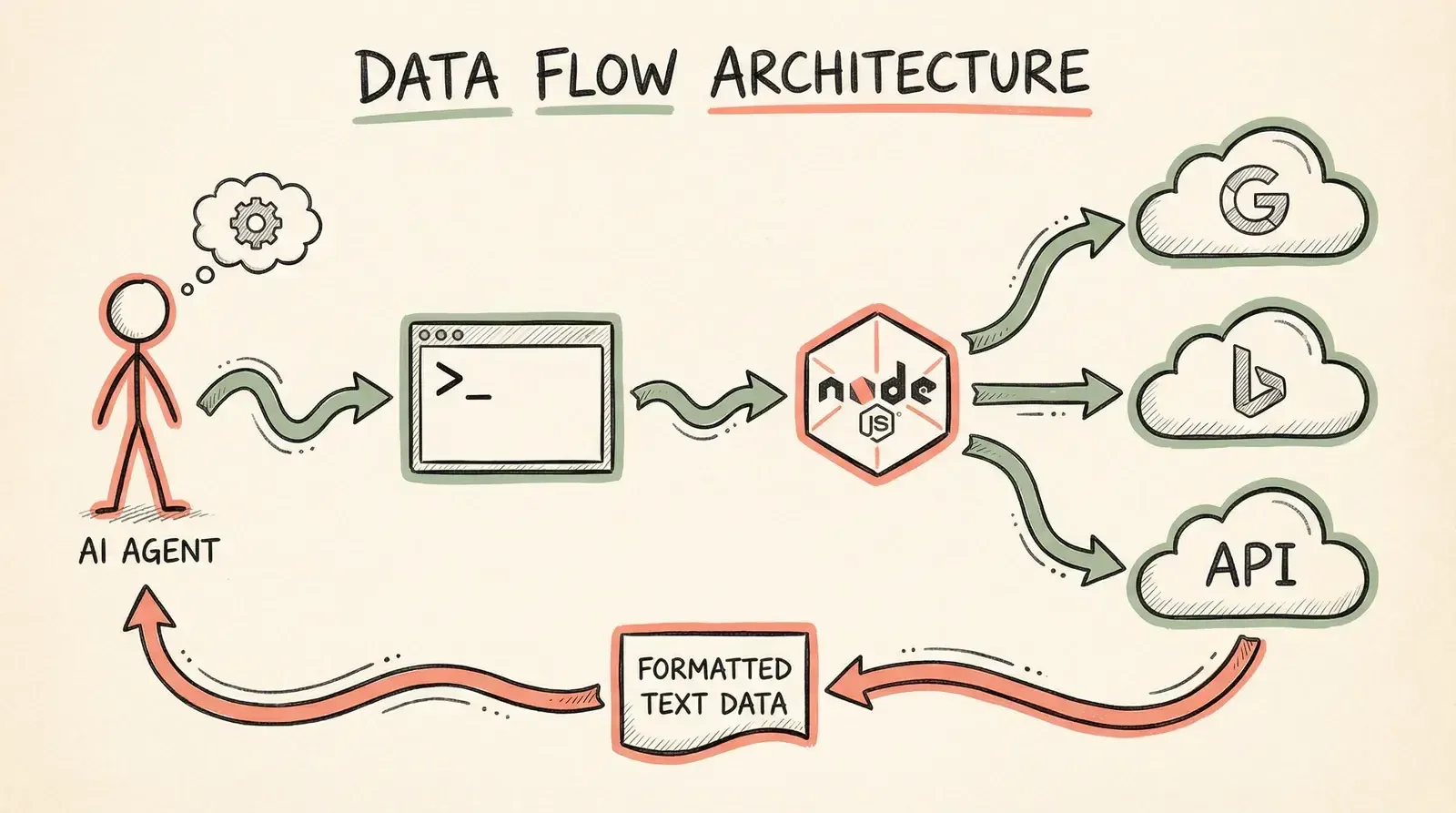 件结构:**
~/.openclaw/workspace/
├── scripts/
│   ├── gsc-report.cjs      # Google Search Console 查询
│   ├── ga4-report.cjs      # Google Analytics 4 查询
│   └── bing-report.cjs     # Bing Webmaster 查询
└── credentials/
    ├── gcp-service-account.json     # Google 服务账号密钥
    └── bing-webmaster-api-key.txt  # Bing API Key
一、Google Cloud Console 配置 (15 分钟)
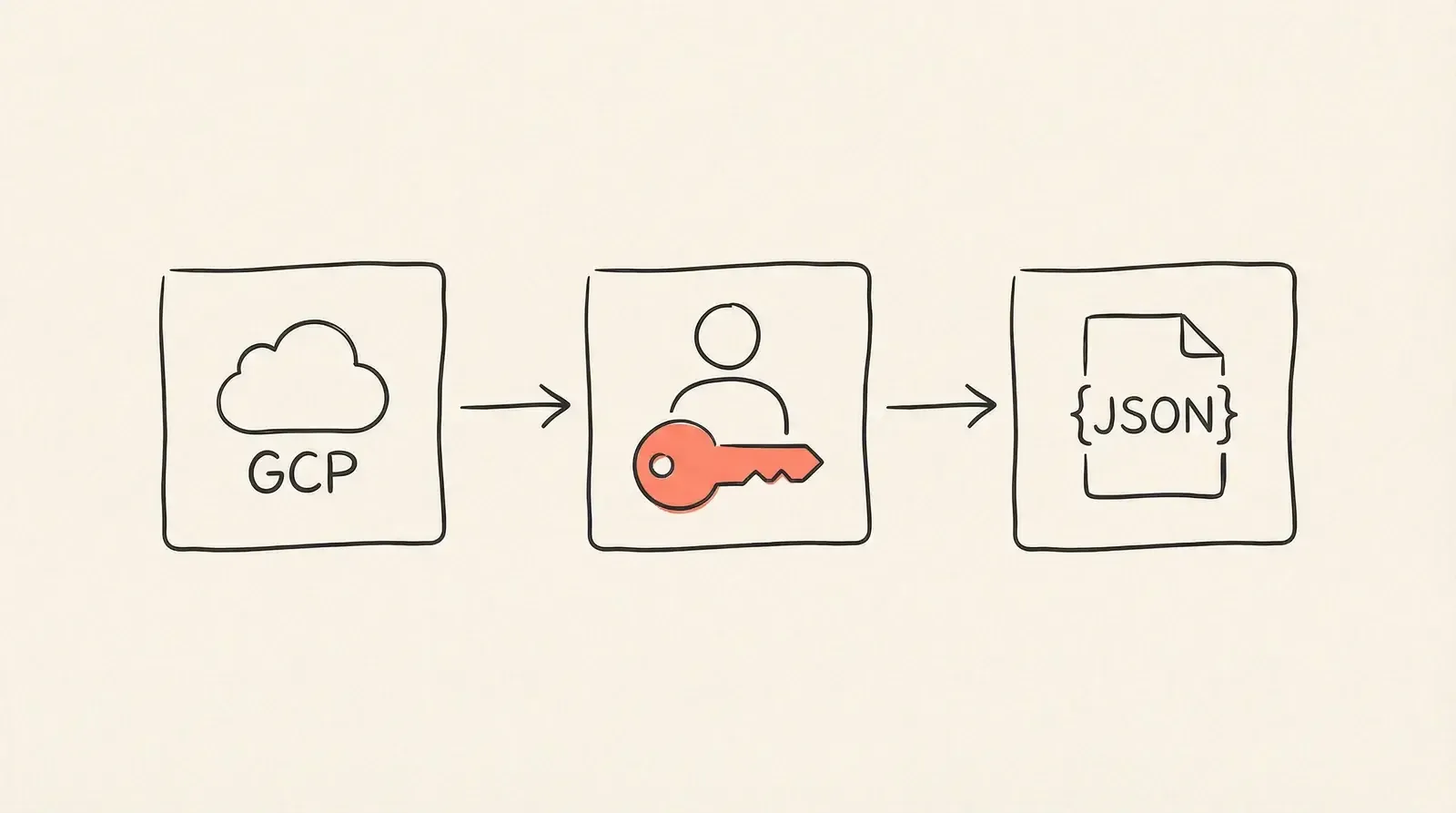 penclaw-seo`)
-
进入 IAM & Admin → Service Accounts
-
点击「Create Service Account」
-
名字随意,如
openclaw-seo-reader -
角色:可以不选(后续权限在各平台单独授权)
-
-
创建好后,点击该 SA → Keys → Add Key → Create new key → JSON
-
下载 JSON 文件,保存到:
~/.openclaw/workspace/credentials/gcp-service-account.json
JSON 文件长这样:
{
  "type": "service_account",
  "project_id": "your-project-id",
  "private_key_id": "...",
  "private_key": "-----BEGIN RSA PRIVATE KEY-----
...",
  "client_email": "openclaw-seo-reader@your-project.iam.gserviceaccount.com",
  ...
}
⚠️ 记住
client_email这个邮箱地址,后面 GSC 和 GA4 授权都要用它。
1.2 启用 API
在 Google Cloud Console 的「APIs & Services → Library」中搜索并启用以下两个 API:
-
Google Search Console API
-
Google Analytics Data API
两个都要启用,否则脚本会报 API has not been enabled 错误。
二、Google Search Console 授权 (10 分钟)
GSC 的权限不是在 Google Cloud 设置的,而是在 Search Console 网站本身。
-
选择你的站点(每个站都要单独操作)
-
左侧「设置」→「用户和权限」→「添加用户」
-
输入 Service Account 的
client_email -
权限选择「受限」即可(只读,够用了)
⚠️ 踩坑:每个站都要手动加一次,没有全局批量授权的方法。
三、Google Analytics 4 授权 (10 分钟)
-
左下角「管理」→ 选择目标媒体资源(Property)
-
「媒体资源」栏 →「媒体资源访问权限管理」
-
右上角「+」→「添加用户」
-
输入 Service Account 的
client_email,角色选「查看者」
⚠️ 踩坑:GA4 的 Property ID 和数据流 ID 是两个不同的东西!
Property ID:在「媒体资源」→「媒体资源详情」里看,是一串纯数字,比如
489888837数据流 ID:在「数据流」里看,也是数字但不同
脚本里用的是 Property ID,格式为
properties/489888837,别填成数据流 ID!
四、Bing Webmaster Tools 配置 (5 分钟)
Bing 的方式更简单,不需要 Service Account,直接用 API Key:
-
右上角「设置」(齿轮图标)→「API access」
-
点击「Generate API Key」
-
复制 API Key,保存到:
~/.openclaw/workspace/credentials/bing-webmaster-api-key.txt
文件里直接放纯文本的 key,一行即可。
五、安装依赖 (5 分钟)
在脚本目录里初始化 npm 并安装依赖:
cd ~/.openclaw/workspace/scripts
npm install googleapis google-auth-library
⚠️ 踩坑:
package.json** 里不要加"type": "module"!**如果你的
package.json有"type": "module", Node.js 会把所有.js文件当作 ES Module 处理,导致require is not defined报错。解决方案:**把脚本文件命名为
.cjs而不是 **.js,这样无论package.json怎么配置,Node.js 都会用 CommonJS 模式加载。这就是为什么脚本叫gsc-report.cjs而不是gsc-report.js。
六、脚本实现 (15 分钟)

6.1 GSC 脚本:gsc-report.cjs
查询关键词排名、点击、展示、CTR 和 Top 页面。
#!/usr/bin/env node
const { google } = require('googleapis');
const path = require('path');

const KEY_PATH = path.join(__dirname, '../credentials/gcp-service-account.json');

// 站点列表 - 注意格式!
const SITES = [
  'sc-domain:tools.sagasu.art',    // 域名资源用 sc-domain: 前缀
  'sc-domain:slitherlinks.com',
  // 'https://example.com/',        // URL 前缀资源用完整 URL(含尾斜杠)
];

async function main() {
  const auth = new google.auth.GoogleAuth({
    keyFile: KEY_PATH,
    scopes: ['https://www.googleapis.com/auth/webmasters.readonly'],
  });
  const searchconsole = google.searchconsole({ version: 'v1', auth });

  for (const siteUrl of SITES) {
    // 查 Top 关键词
    const res = await searchconsole.searchanalytics.query({
      siteUrl,
      requestBody: {
        startDate: '2024-01-01',
        endDate: '2024-01-28',
        dimensions: ['query'],
        rowLimit: 20,
      },
    });
    console.log(res.data.rows);
  }
}
main().catch(console.error);
⚠️ 踩坑:GSC 资源名格式有两种,必须跟 Search Console 里一致!
「域名资源」(Domain property):格式为
sc-domain: example.com「网址前缀资源」(URL-prefix property):格式为
https://example.com/(注意末尾斜杠)如果格式不对,API 会返回
403 User does not have sufficient permission错误,但这个错误信息很误导人,实际上是资源名写错了。可以先调用searchconsole.sites.list()列出所有已授权站点来确认正确格式。
运行方式:
# 查所有站点
node scripts/gsc-report.cjs

# 只查某个站
node scripts/gsc-report.cjs slitherlinks

# 查某个站的特定关键词
node scripts/gsc-report.cjs slitherlinks "puzzle"
输出示例:
=== sc-domain:slitherlinks.com (2024-01-01 ~ 2024-01-28) ===

总点击: 1234 | 总展示: 45678 | 平均CTR: 2.7% | 平均排名: 18.3

Top 关键词:
1. slitherlink puzzle | 320 | 8900 | 3.6% | 4.2
2. slither links | 210 | 6700 | 3.1% | 5.8
...
6.2 GA4 脚本:ga4-report.cjs
查询用户、会话、页面浏览、流量来源、国家分布。
#!/usr/bin/env node
const { google } = require('googleapis');
const path = require('path');

const KEY_PATH = path.join(__dirname, '../credentials/gcp-service-account.json');

// Property ID(纯数字,不是数据流 ID)
const PROPERTIES = {
  'slitherlinks': '500316116',
  'ai-mazegenerator': '440473819',
};

async function main() {
  const auth = new google.auth.GoogleAuth({
    keyFile: KEY_PATH,
    scopes: ['https://www.googleapis.com/auth/analytics.readonly'],
  });
  const analyticsdata = google.analyticsdata({ version: 'v1beta', auth });

  const days = 28;

  for (const [name, propertyId] of Object.entries(PROPERTIES)) {
    const res = await analyticsdata.properties.runReport({
      property: `properties/${propertyId}`,  // 注意要加 "properties/" 前缀
      requestBody: {
        dateRanges: [{ startDate: `${days}daysAgo`, endDate: 'today' }],
        dimensions: [{ name: 'sessionDefaultChannelGroup' }],
        metrics: [{ name: 'sessions' }, { name: 'activeUsers' }],
        orderBys: [{ metric: { metricName: 'sessions' }, desc: true }],
      },
    });
    console.log(name, res.data.rows);
  }
}
main().catch(console.error);
运行方式:
# 查所有站点,默认 28 天
node scripts/ga4-report.cjs

# 只查某个站,指定天数
node scripts/ga4-report.cjs slitherlinks 7
6.3 Bing 脚本:bing-report.cjs
查询 Bing 流量、关键词、爬取统计。Bing API 用 HTTPS 请求,不需要 OAuth。
#!/usr/bin/env node
const https = require('https');
const fs = require('fs');
const path = require('path');

const API_KEY = fs.readFileSync(
  path.join(__dirname, '../credentials/bing-webmaster-api-key.txt'), 'utf8'
).trim();

const BASE = 'https://ssl.bing.com/webmaster/api.svc/json';

const SITES = [
  'https://slitherlinks.com/',   // Bing 用完整 URL,含协议和尾斜杠
  'https://ai-mazegenerator.com/',
];

function fetchJson(url) {
  return new Promise((resolve, reject) => {
    https.get(url, res => {
      let data = '';
      res.on('data', c => data += c);
      res.on('end', () => resolve(JSON.parse(data)));
    }).on('error', reject);
  });
}

async function main() {
  for (const siteUrl of SITES) {
    // 流量统计
    const stats = await fetchJson(
      `${BASE}/GetRankAndTrafficStats?siteUrl=${encodeURIComponent(siteUrl)}&apikey=${API_KEY}`
    );
    // 关键词数据
    const keywords = await fetchJson(
      `${BASE}/GetQueryStats?siteUrl=${encodeURIComponent(siteUrl)}&apikey=${API_KEY}`
    );
    console.log(siteUrl, stats.d?.slice(-7), keywords.d?.slice(0, 15));
  }
}
main().catch(console.error);
🚀 使用指南
在 OpenClaw 里,Agent 通过 exec 工具直接调用脚本:
你:帮我看看最近 slitherlinks.com 的 SEO 表现
AI:(内部调用)exec: node ~/.openclaw/workspace/scripts/gsc-report.cjs slitherlinks
    (读取输出)exec: node ~/.openclaw/workspace/scripts/ga4-report.cjs slitherlinks 7
    → 汇总分析,给出建议
Agent 拿到文本格式的数据后,可以做:
-
对比本周 vs 上周的变化
-
找出点击率最低但展示量大的关键词(优化机会)
-
发现流量下降的页面
-
生成每日/每周 SEO 报告
⏰ 进阶配置:定时报告(可选)
用 cron 每天早上自动生成报告并通过 OpenClaw 推送:
# 编辑 crontab
crontab -e

# 每天早 8 点生成 SEO 报告
0 8 * * * node /Users/yourname/.openclaw/workspace/scripts/gsc-report.cjs >> /tmp/seo-report.log 2>&1
或者在 OpenClaw 的 HEARTBEAT.md 里加入 SEO 检查任务,让 Agent 定期主动查询。
🔒 安全注意事项
-
credentials/目录已在.gitignore中,绝对不要上传到 GitHub -
Service Account 只申请了只读权限(
readonlyscope),即使密钥泄露也无法修改数据 -
Bing API Key 是纯文本文件,注意文件权限:
chmod 600 ~/.openclaw/workspace/credentials/bing-webmaster-api-key.txt
chmod 600 ~/.openclaw/workspace/credentials/gcp-service-account.json
⚠️ 踩坑总结

| 问题 | 原因 | 解决 |
|---|---|---|
require is not defined | package.json 有 "type": "module" | 文件改名为 .cjs |
403 insufficient permission | GSC 资源名格式错误 | 用 sites.list() 确认正确格式 |
sc-domain: vs https:// | 两种资源类型格式不同 | 域名资源用 sc-domain:, URL 前缀用完整 URL |
| GA4 Property ID 填错 | 误填了数据流 ID | 去「媒体资源详情」确认纯数字 Property ID |
API 返回 API not enabled | 忘记在 GCP 启用 API | 去 Library 搜索并启用对应 API |
| 新站没数据 | SA 没加到该站的 GSC/GA4 权限 | 每个站都要单独授权 |
整套流程下来大约需要 30-60 分钟,主要时间花在 Google Cloud Console 配置和各站点授权上。一旦配置完成,AI Agent 就能随时查询任意站点的 SEO 数据,做对比分析、诊断问题、给出优化建议。